


Which Tool Is Better for Managing Team Data: Airtable or Google Sheets?
Airtable vs. Google Sheets is one of the most common comparisons for teams and individuals looking to improve how they organize, manage, and collaborate on data. Both tools are widely used for task tracking, project management, and data analysis, but they serve different functions and have varying degrees of complexity and flexibility.
Efficient data management is essential for productive workflows and seamless collaboration. Google Sheets has long been the go-to spreadsheet tool for millions of people, providing familiar functionality and strong collaboration features. However, tools such as Airtable are changing the game by providing a database-oriented approach to data management, combining spreadsheet simplicity with the power of relational databases, customizable views, and built-in automation.
As a result, many users wonder things like, “Is Airtable just a fancier spreadsheet?”, “Should I switch from Google Sheets to Airtable?”, or explore threads like “Airtable vs Google Sheets Reddit” to hear real user experiences.
This article delves deeply into both tools, covering everything from structure and features to automation, collaboration, pricing, and use cases, to help you decide which platform is best for your workflow, team, or business.
Understanding the Basics
What is Google Sheets?
Google Sheets is a cloud-based spreadsheet tool that comes as part of the Google Workspace suite (formerly G Suite). It’s a free-to-use application with a traditional spreadsheet interface that makes it easy to enter data, use formulas, generate charts, and collaborate in real time with others.
One of Google Sheets' most significant advantages is its accessibility. Anyone with a Google account can create, edit, and share spreadsheets, whether on a laptop or mobile device. Some of the core features of Google Sheets include:
- A familiar spreadsheet layout with cells, rows, and columns
- Real-time editing and commenting
- Strong support for formulas, data validation, pivot tables, and charts
- Seamless integration with other Google apps like Docs, Drive, Gmail, and Calendar
- Google Sheets offline mode for using when no internet connection is available
However, despite its power in calculations and data analysis, Google Sheets functions as a flat file system. It lacks native support for relational data, which means linking data across different sheets or tabs often requires complex formulas like VLOOKUP (Vertical Lookup), INDEX/MATCH, or custom scripting.
To bridge the gap between spreadsheets and databases, Google has introduced Google Tables, a tool that attempts to bring relational data management and light automation to Google’s ecosystem. While promising, Google Tables is still maturing and does not not yet match Airtable in flexibility and user experience.
What Is Airtable?
Airtable is a cloud-based collaboration platform that combines the familiarity of spreadsheets with the powerful capabilities of relational databases and no-code automation. At its core, Airtable lets users build custom "bases" (similar to databases) where data can be structured, linked, visualized, and automated according to specific workflows.
Unlike the common spreadsheets, Airtable supports:
- Relational data (e.g., linking tasks to projects)
- Multiple views (Grids, Calendars, Kanban boards, and Timelines)
- No-code automations for workflows
- Granular, object-specific permissions for roles like Owner, Creator, and Editor
Airtable is highly flexible, serving users from solo freelancers to enterprise teams. Whether you’re managing editorial content, planning events, tracking inventory, or organizing a CRM system, Airtable can be tailored to fit your needs.

Key Differences Between Airtable and Google Sheets
Below are some key differences between Airtable and Google Sheets:
- Data Structure & Relationships
One of the most important differences between Airtable and Google Sheets is how they handle data structure.
Google Sheets is built for flat, two-dimensional data. This means each row is independent, and while you can link data across multiple sheets, it requires formulas and often complex logic.
Airtable, on the other hand, offers a true relational data model. You can link records between tables (e.g., contacts to companies, tasks to projects), allowing data to be reused and referenced automatically. This reduces duplication, improves consistency, and enables more powerful reporting and filtering.
Say, for instance, in Google Sheets, if you change a client’s email in one place, you have to manually update it everywhere else. In Airtable, updating a linked record updates it across all related tables.
This makes Airtable a more robust solution for teams that need to manage interconnected datasets, like content pipelines, CRM systems, and product development cycles.
- Collaboration & Permissions
Both Airtable and Google Sheets support real-time collaboration, but they differ significantly in how they manage permissions.
- The three primary access levels offered by Google Sheets are View, Comment, and Edit.
- Airtable provides granular permissions management where you can:
- Restrict access at the field or view level
- Create personalized views for each team member
- Set read-only views for external collaborators or stakeholders
- Assign editor, commenter, and creator roles at the base or workspace level
This makes Airtable ideal for larger teams, agencies, or organizations that need to protect sensitive data while still enabling collaboration.
- Views & Customization
Google Sheets offers a static spreadsheet interface. While you can freeze panes, filter data, and use conditional formatting, every user sees the same data layout.
Airtable takes customization much further with multiple built-in views that allow different team members to visualize the same data in ways that make the most sense for their roles:
- Grid View for traditional data tables
- Calendar View for tracking deadlines or events
- Kanban View for status-based workflows (like Trello)
- Gallery View for visually displaying records with images
- Gantt View for advanced project timelines (Pro plan)
Each view can be filtered, sorted, and customized without affecting how others see the data, making Airtable ideal for diverse workflows.
- Automation & Integrations
When it comes to automation:
- Google Sheets supports automation via Google Apps Script, which is powerful but requires coding.
- Airtable provides a no-code automation builder, allowing users to:
- Send Slack or email notifications
- Update records automatically
- Create recurring tasks
- Trigger actions based on changes in a table
Both tools integrate with external platforms like Zapier, Slack, Gmail, Outlook, and more. However, Airtable’s automation features are far more advanced and visual, making it accessible to non-technical users.
- Templates & Onboarding
Google Sheets comes with basic templates for budgeting, calendars, to-do lists, and grade tracking. They’re useful for personal tasks or light business use but typically require customization.
Airtable offers a much more robust library of industry-specific templates, such as:
- Content Calendars
- Product Launch Planners
- Event Management Dashboards
- Recruitment Trackers
- Editorial Pipelines
These templates come pre-configured with linked tables, custom views, and automations, helping teams onboard quickly and reduce setup time. And, for even more flexibility and smart automation, Airtable’s Omni AI can help generate tailored solutions for your team’s specific needs, making the transition from spreadsheets even smoother.
If you're switching from spreadsheets to Airtable, you can import existing Google Sheets files and map them into relational bases during setup.
Airtable vs Google Sheets Pricing
Many users ask, "Is Airtable free?" or compare pricing when deciding between these tools. Here is a quick look into the prices for Google Sheets and Airtable plans.
Google Sheets
- Free for personal use with up to 15GB of storage across all Google apps
- Business plans start at $6/user/month with Google Workspace (includes Gmail, Drive, Meet, etc.)
Airtable
- Free tier includes:
- Unlimited bases
- 1,200 records per base
- Limited automation (100 runs/month)
- Paid plans (2025 pricing):
- Plus: $20/user/month
- Pro: $45/user/month
- Enterprise: Custom pricing
While Google Sheets is more affordable, Airtable’s pricing reflects its additional value: relational data handling, customizable views, built-in automation, and role-based access. For smaller teams or startups, a free or basic Airtable plan may be sufficient until your workflow grows in complexity.
Airtable vs Google Sheets vs Excel vs Smartsheet vs Notion
When exploring tools beyond Google Sheets, it's common to compare Airtable with options like Excel, Smartsheet, and Notion. Each has its strengths, and here is a quick comparison table:
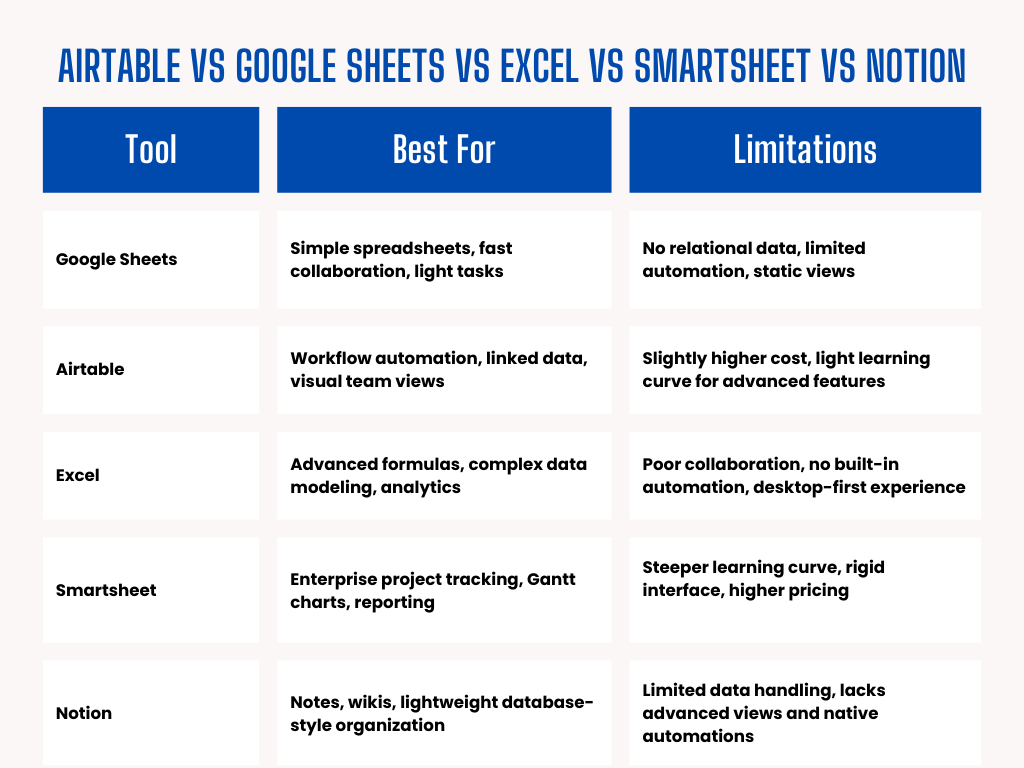
Each tool has strengths, but Airtable uniquely combines the power of a relational database with the ease of use of a spreadsheet, adding multiple data views, no-code automation, and fine-grained collaboration controls. It adapts easily to a wide range of workflows, from content calendars and product roadmaps to CRMs and inventory systems, all within a user-friendly, visually rich platform.
While tools like Notion and Smartsheet serve more specialized use cases, Airtable remains one of the most versatile and scalable platforms for handling relational data, making it a smart long-term choice for teams that want both structure and flexibility.
Which One Should You Choose?
If your needs are simple and you’re looking for a free, easy-to-use, and collaborative spreadsheet, Google Sheets is an excellent choice. It works best when your data is mostly flat and formula-driven, and you’re either working alone or in a small team. Plus, if you already use Google Workspace apps, Google Sheets fits seamlessly into your workflow.
Choose Google Sheets if:
- You need a free, simple spreadsheet solution
- Your data is mostly flat and formula-driven
- You collaborate with small teams or across departments
- You want easy access via Google Workspace apps
- You're already using other Google services
On the other hand, if your work involves managing more complex, interconnected data, Airtable offers powerful features that go beyond basic spreadsheets. It allows you to automate repetitive tasks without any coding and provides custom views like Kanban, Calendar, or Gantt charts to help you visualize your projects more effectively. Airtable also supports role-based permissions, making it ideal for teams that require secure and organized collaboration.
Choose Airtable if:
- You work with complex, relational data
- You want to automate repetitive tasks without coding
- You need custom views like Grid, Form, Calendar, Gallery, Kanban, List, Timeline, or Gantt
- Your team requires role-based permissions
Conclusion
Choosing between Airtable and Google Sheets ultimately depends on your team’s needs and workflow complexity.
- Google Sheets is unbeatable for simple spreadsheets, collaborative editing, and cost-efficiency.
- Airtable is ideal for structured, scalable workflows that require relational data, visual customization, and built-in automation.
If you’re managing large projects, organizing teams, or building internal systems, Airtable’s additional features can deliver a high return on investment. But for straightforward data entry, calculations, or tracking tasks with limited complexity, Google Sheets remains a reliable and familiar tool.
Still unsure whether Airtable or Google Sheets is the right fit for your workflow? We’ve got you covered. Whether you're testing a small project, evaluating integrations, or simply exploring how Airtable can boost your team’s productivity, our team is here to help.
Get in touch today to explore Airtable integrations, features, and personalized setup guidance tailored to your needs.


