


Framer vs Webflow: Key Differences Explained (2026)
TL;DR
In 2026, Framer and Webflow are not just website builders. They represent two different ways of thinking about how websites are created and scaled.
1 . Best overall depends on intent: Webflow for structured, scalable systems, Framer for fast design-led launches
2. Best for designers: Framer, because it feels like a modern design tool with instant visual output
3. Best for SEO and content systems: Webflow, due to its stronger CMS and structured architecture
4. Best for speed: Framer, since it reduces friction between design and publishing
5. Key takeaway: Framer is built for speed and expression, Webflow is built for systems and long-term scale
Framer vs Webflow Comparison Table: At-a-Glance
Here is a quick comparison between Framer and Webflow:
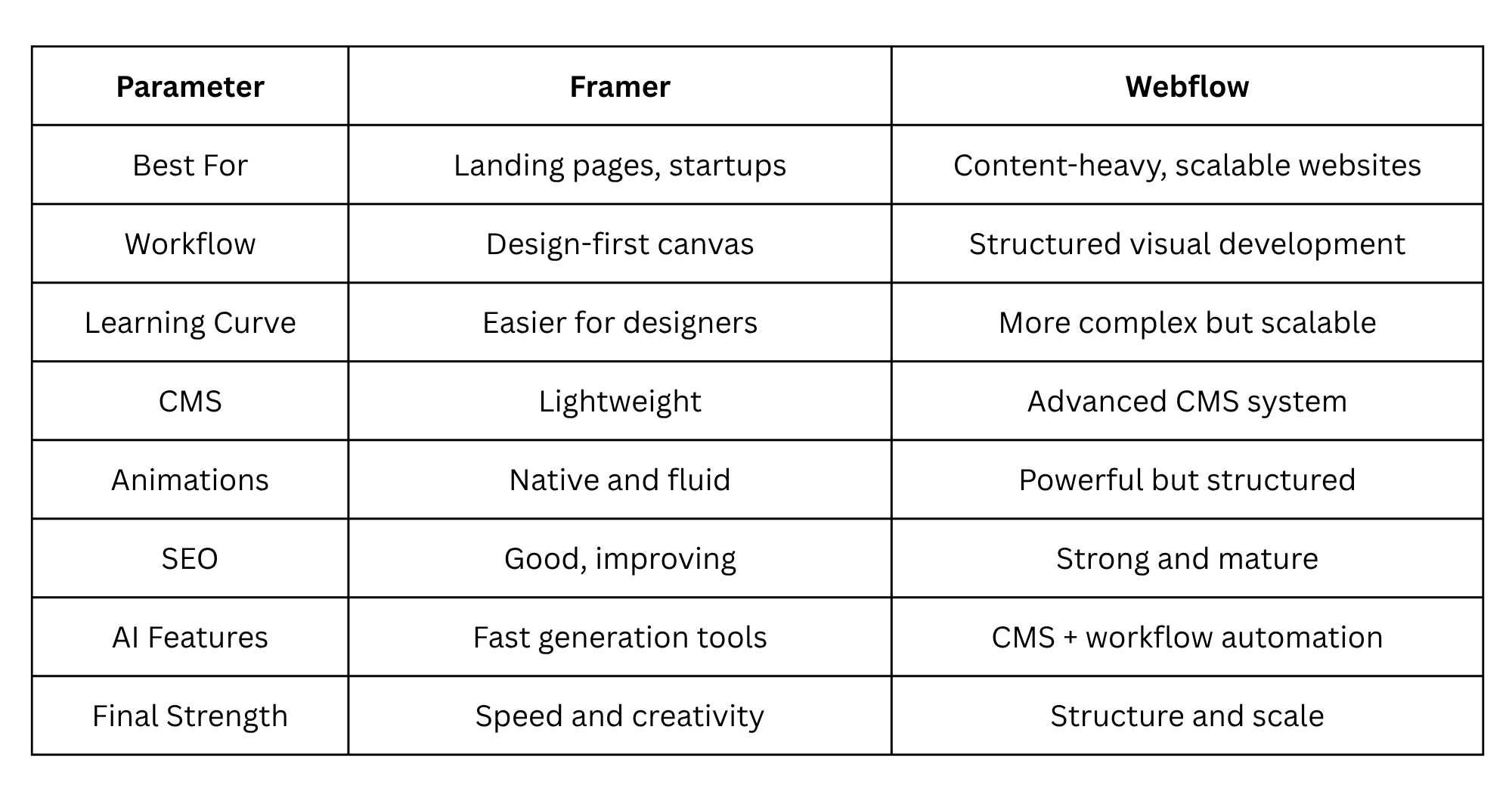
What this table does not fully capture is how differently these tools behave over time. That long-term behavior is often what actually decides which one is better for a business.
Why the Framer vs Webflow Debate Matters in 2026
Just a few years ago, most businesses had websites for information purposes, and from there, they were similar to the brochures that explained what they did along with their contact information. That was good enough in the past because the standard of required service was not high.
As of the year 2026, the definition of a website has completely changed.
The website has now become, in many cases, the hub of a company's full business system. A website serves as the place where a user discovers a brand, develops a trust relationship with that brand, consumes content related to that brand, and, finally, becomes a customer of that brand. In fact, in many cases, the website is more than a supporting asset; it has become the primary engine for growth.
Because of these changes, the tools used to develop a company’s website are more important than ever. Instead of just asking how easy it is to use, we also ask how well it is designed to scale and how well it is intended to perform over the long term.
This is where Framer and Webflow diverge from each other in a significant manner.
Framer is built around speed and creative expression. It comes from a design-first mindset where ideas move quickly from concept to output. It reduces friction between thinking and publishing.
Webflow is built around structure and system thinking. It behaves more like a visual layer on top of frontend development principles, where layout logic, CMS structure, and scalability are central.
This difference is not cosmetic. It shapes how websites evolve, how teams collaborate, and how sustainable the system becomes over time.
Framer vs Webflow: 9 Head-to-Head Comparisons
1. Design Flexibility & Workflow
Design today is about how fast ideas can become real and testable.
Framer prioritizes immediacy. It feels like working in a live design environment where every change updates instantly. There is almost no separation between designing and publishing. This creates a very fast creative loop where experimentation is easy and natural.
Webflow approaches design with structure in mind. It introduces layout systems, class structures, and responsive rules in a visual format. This slows down early experimentation slightly, but it creates consistency and scalability that becomes important as projects grow.
Winner: Framer for speed, Webflow for structure
2. Ease of Use & Learning Curve
However, ease of use goes beyond initial ease of use. Rather, it refers to how fast a group of people will be productive without being hindered by growth in the future.
For ease of use, Framer wins as it is similar to modern user interface design applications. Framer allows designers to design and deploy easily without knowing advanced coding techniques.
The Webflow application is difficult to learn as it uses ideas related to front-end development. Once learned, however, Webflow turns out to be more powerful than Framer.
Winner: Framer for beginners, Webflow for professionals
3. CMS & Content Management
Here is where the distinction gets quite obvious.
Framer offers a CMS solution that’s lightweight enough to work perfectly on simple sites, landing pages, and other light content-related projects. It is made to be fast, but not deeply structured.
Webflow offers a CMS solution with a fully-fledged structure acting much like a database. Such a structure allows you to have content relations and dynamic content generation.
Winner: Webflow
4. Animations & Interactions
In Framer, animations are considered a fundamental feature of design. The design process includes motion, thus allowing for interactions that look smooth and effortless.
Webflow also has animations in its features; however, they are created via structured triggers and timelines. This gives control yet appears more technical than natural.
Winner: Framer
5. Templates & Starting Points
Framer templates look quite modern and minimalistic. Their design is aimed at rapid launches when looks matter from the very beginning.
Templates in Webflow have a more system-like approach to their creation, requiring some initial efforts but providing more flexibility later on because of the connection to CMS.
Winner: Depends on use case
6. Pricing & Plans (2026)
Framer is usually less costly for smaller projects and early-stage websites. It has fewer costs associated with the creation process of a website.
Webflow pricing will depend heavily on the use of CMS, collaborations, etc. It is initially costly yet justified later due to growth into the system of websites.
Winner: Framer for small projects, Webflow for scaling businesses
7. SEO & Performance
Framer has good SEO capabilities in terms of metadata control and performance optimization. However, it is best suited for simple websites.
Webflow excels in this category because of its structured content management, clean output, and better controls over SEO architecture.
Winner: Webflow
8. AI Features
Framer AI is geared towards quick prototyping, making it easy to generate layouts, pages, and copy at a high speed. It adheres to the philosophy of Framer.
Webflow AI emphasizes workflow efficiency and content system support, particularly when building CMS-based websites.
Winner: Framer for speed, Webflow for systems
9. Ecosystem & Integrations
Webflow has developed an elaborate ecosystem consisting of agencies, plugins, integrations, and enterprise workflows.
The Framer ecosystem is still young but developing rapidly, particularly within the design community.
Winner: Webflow
What Are the Key Factors to Consider When Choosing Between Framer and Webflow
The choice between Framer and Webflow is much easier to make once the emphasis shifts from functionality to results. If the purpose of the website is to create fast marketing campaigns, launch products, or test solutions, Framer is typically a better choice due to its emphasis on speed.
If the website needs to develop into a long-term content management system and have proper SEO and structured data, Webflow will be a better solution.
Apart from that, the structure of the team working on the project should also be taken into account. Solitary designers will find Framer preferable, while teams and agencies will opt for Webflow because structure becomes essential in a collaborative setting.
Frequently updating sites work better with Webflow CMS, whereas occasional updates are preferred for Framer. Also, a long-term perspective is crucial. Sometimes websites are created temporarily for specific purposes, while other projects will need to evolve into permanent systems.
When to Choose Framer Over Webflow (and Vice Versa)
Framer makes the most sense when speed is the primary goal. It works well for startup landing pages, early product validation, and design-heavy marketing sites where fast iteration matters more than structure.
It is also useful when visual expression and motion design are more important than backend content systems. Solo designers and small teams often find it aligns naturally with their workflow.
Webflow makes more sense when the website becomes infrastructure. This includes content-heavy platforms, SEO-driven websites, agency projects, and long-term business systems that need structure and scalability.
In simple terms, Framer is for launching ideas quickly, while Webflow is for building systems that last.
Conclusion
Framer and Webflow represent two different philosophies of building for the web.
Framer is about speed and creativity, allowing users to quickly take an idea from an idea to a functioning design main website. Webflow is all about structure and scalability and ultimately grand system design; it gives you more control over CMS, SEO and the compiling of complex content types. When deciding which one to use, you will need to think about what do you want your website to grow into in the future. This comparison was done through the evaluation of both products with their hands-on use in real-world projects, including designing live sites, structuring content with CMS', performance testing, and reviewing behavior with SEO within these applications. In addition to actual implementation of services will be included as part of how they work from a testing perspective, so there would be no theoretical assumptions made about either application. Our purpose isn't to find a winner but rather evaluate how both tools work within a true workflow.
If your focus is speed, experimentation, and fast marketing pages, Framer is often the better choice. If you need scalable CMS structure, stronger SEO control, and a system built for long-term growth, Webflow is usually the better fit.
At WebSnap, we help businesses choose the right platform and build on it the right way. We are a web design and development company that builds modern websites, migrates projects from platforms like WordPress and Wix, sets up scalable CMS systems for SEO growth, and integrates marketing, analytics, and automation tools to improve performance and conversions.
If you’re planning a new website or thinking about switching platforms, feel free to connect with us, we can help you design, build, and optimize the right setup for your goals.
Frequently Asked Questions
1 . Is Framer better than Webflow?
Framer is faster and more visually appealing for creating sites that will be published quickly with limited functionality, while Webflow is designed for building flexible sites over time with expandable content. Therefore, it depends on your site design and length of use to choose between them.
2. Is Framer easier to use than Webflow?
Framer is faster and more visually appealing for creating sites that will be published quickly with limited functionality, while Webflow is designed for building flexible sites over time with expandable content. Therefore, it depends on your site design and length of use to choose between them.
Framer is more user-friendly than Webflow because it has a more intuitive graphic design interface, and the interface is similar to traditional design software that many designers are familiar with. The downside of Framer is that you are limited to creating simple sites quickly, but since Webflow allows you to create flexible sites over extended periods of time, the extra time taken to learn how to use the program is worth it in the long run.
3. Which is best for search engine optimization (SEO), Framer or Webflow?
In general, Webflow has an advantage for search engine optimization (SEO) since it has been designed around well-defined structured content systems. As such, Webflow gives users a greater degree of control over the layout and/or structure of their web pages, content managed through a CMS and the technical elements that make up search engine optimization (SEO). Framer does reasonably well with basic search engine optimization (SEO) setups, but it does not have the capabilities necessary to support large content strategies or websites with highly structured pages as well as Webflow.
4. Can Framer create ecommerce websites?
Framer does provide options for creating simple or lightweight ecommerce websites; however, Framer was not created to support large scale ecommerce businesses. Webflow, on the other hand, provides a greater variety of advanced features and options to support full-scale ecommerce-based websites. Additionally, while Framer provides some support for ecommerce, it does not provide ecommerce solutions with the same depth as Webflow or dedicated ecommerce platforms, making them better choices for customers with serious ecommerce businesses.


