



Webflow SEO Checklist: 15 Fixes That Improve Rankings, Performance & Accessibility
TL;DR
1 . Webflow SEO combines technical SEO, content optimization, performance, and accessibility improvements.
2. Webflow ships with clean code, fast hosting, SSL, and built-in SEO controls.
3. Strong rankings depend on content quality, Core Web Vitals, and user accessibility.
4. Common mistakes include duplicate titles, poor mobile optimization, and broken redirects.
5. Most fixes can be implemented within one to three days.
6. Performance and indexing improvements often appear within a few weeks.
7. Content-driven ranking gains typically take three to six months.
8. Accessibility improvements also strengthen UX and engagement metrics.
9. Webflow handles many technical basics automatically, but manual optimization still matters.
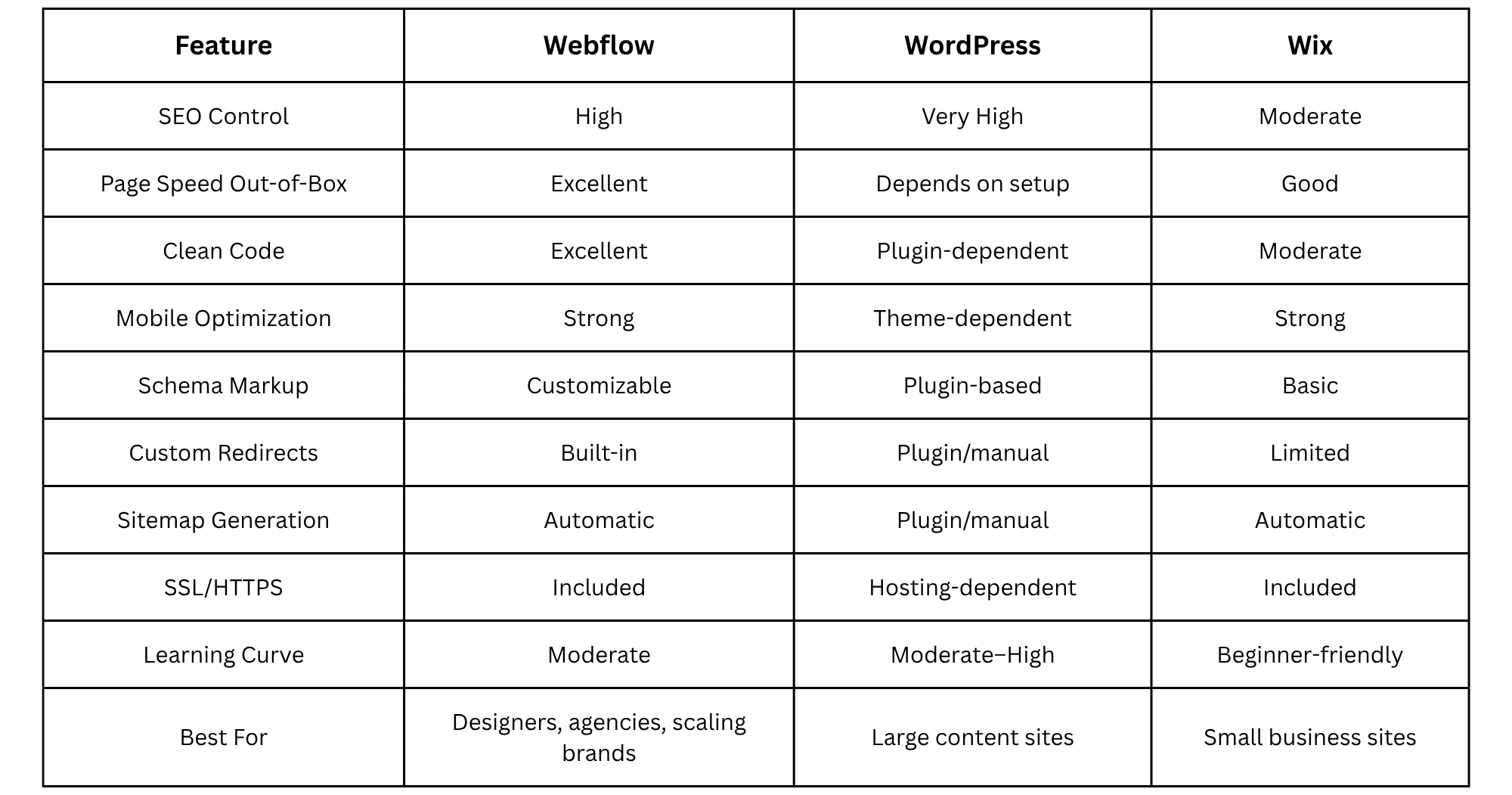
Webflow vs WordPress vs Wix: SEO Capabilities Comparison
Choosing the right website platform affects how easily you can manage SEO, speed, and technical optimization. Here is a quick table that shows how Webflow compares to WordPress and Wix for modern SEO workflows.
Why Webflow SEO Works (When Done Right)
Webflow is considered one of the best SEO web platforms since it allows for flexible designing while maintaining clean coding at the same time. Whereas other drag-and-drop solutions create a bloated HTML and CSS code, Webflow creates clean HTML, CSS, and JS that search engines can crawl easily.
There are also plenty of useful built-in SEO features in Webflow, such as automatic SSL certificates, XML Sitemaps generation, meta tags customizations, clean URL settings, and responsiveness customization. As you see, there is already a solid technical base for further optimization.
Nevertheless, Webflow is not enough to rank your website.
A lot of websites are not able to rank high due to their inability to optimize performance, accessibility, or even content. Google algorithms favor those websites that are fast, accessible, and user-friendly.
That is why today Webflow SEO requires an approach that combines keyword optimization, improved performance, and accessibility.
This checklist will help with all that.
The 3 Pillars of Webflow SEO in 2026
Modern Webflow SEO revolves around three major ranking pillars.
1. Content & Keywords
Content is still the bedrock of SEO. Each web page needs to focus on search intent and have good keyword optimization, headings, meta data and internal linking to build your expertise and topical authority.
2. Performance & Core Web Vitals
Google still emphasizes the importance of high-performance websites. Key metrics include Largest Contentful Paint (LCP), Interaction to Next Paint (INP), and Cumulative Layout Shift (CLS). These factors have a huge effect on your site’s loading speed, which affects your SEO and conversion.
Core Web Vitals are essential since poor loading times lead to user frustration and inability to access your website content.
3. Accessibility & UX
The importance of website accessibility cannot be overstated, as it is now strongly tied to SEO and website engagement. Websites with better accessibility tend to perform better and are more easily navigable by all users, including those who use screen readers and keyboard navigation.
Website accessibility positively impacts usability signals, such as visit duration, engagement metrics, and mobile interaction quality.
The 15-Point Webflow SEO Checklist
Pillar 1: Content & On-Page SEO
1. Set Unique Title Tags & Meta Descriptions
Each page requires an exclusive title tag and meta description for the targeted keyword.
Keep the title tag under 60 characters and ensure the keyword is placed at the beginning of the title. The meta description needs to provide clear information about the value offered by the page and attract people clicking on your link.
Ensure you avoid duplicating any metadata between the CMS collection pages.
2. Use Proper Heading Hierarchy (H1 → H6)
One page needs to use only one H1 tag.
The other subheadings should have a proper sequence in H2, H3, and so on.
A lot of websites built through Webflow lack proper hierarchical heading structure since web developers focus on aesthetics.
Headings serve different purposes, not purely styling!
3. Optimize Image Alt Text
Alt text enhances both accessibility and search engine optimization for images.
Describe the images naturally but add keywords if needed. Avoid using excessive keywords or nonspecific descriptions like "Image123."
Examples of good alt text include:
- "Webflow dashboard displaying SEO settings"
- "Website performance report from Google PageSpeed Insights"
It can help blind users navigate the website easily.
4. Create XML Sitemap & Submit to Search Console
XML sitemaps are automatically generated in Webflow, however, they need to be submitted to the Search Console.
It helps in getting discovered by Google and monitoring indexing problems.
- Remember to check:
- The presence of an XML sitemap
- The inclusion of important web pages
- Absence of staging pages
- That redirects work properly
5. Enable Clean URLs
Clean URLs improve crawlability and readability.
Bad URL example:
/page?id=234&ref=home
Better URL example:
/webflow-seo-checklist
Use short, descriptive slugs containing target keywords where appropriate.
Avoid unnecessary folders, parameters, or dynamically generated URL strings.
Pillar 2: Performance & Core Web Vitals
6. Compress & Lazy Load Images
Large images are one of the biggest causes of slow websites.
Before uploading assets to Webflow:
- Compress images using modern formats like WebP
- Resize oversized assets
- Enable lazy loading below the fold
This dramatically improves loading speed and Core Web Vitals performance.
7. Minify CSS/JS
Webflow automatically minifies code during publishing, but custom scripts can still create performance problems.
Audit:
- Third-party embeds
- Custom tracking scripts
- External libraries
- Large animation frameworks
Remove unused code wherever possible.
8. Use Webflow’s Built-in CDN
Webflow hosting includes a global Content Delivery Network (CDN), which helps load assets faster worldwide.
To maximize benefits:
- Host assets directly inside Webflow
- Avoid excessive external file requests
- Optimize video delivery
- Reduce render-blocking resources
Fast delivery improves both SEO and user experience.
9. Limit Third-Party Scripts
Too many external tools can destroy performance.
Common offenders include:
- Chat widgets
- Heatmap tools
- Marketing popups
- Excessive analytics platforms
- Social embeds
Only install scripts that provide measurable business value.
Every additional script increases loading time and interaction delays.
10. Optimize LCP with Hero Image Preload
Largest Contentful Paint (LCP) measures how quickly the main content becomes visible.
For most Webflow sites, the hero section image is the LCP element.
Improve LCP by:
- Compressing hero images
- Using modern formats
- Avoiding oversized background videos
- Preloading important above-the-fold assets
Google strongly considers this metric for user experience evaluation.
Pillar 3: Accessibility & UX Signals
11. Add ARIA Labels to Interactive Elements
ARIA labels help screen readers interpret buttons, forms, menus, and navigation elements.
Examples include:
- Search buttons
- Hamburger menus
- Social icons
- Interactive sliders
Without proper labels, accessibility suffers significantly.
12. Ensure Keyboard Navigation Works
Users should be able to navigate your entire website using only a keyboard.
Test:
- Tab order
- Navigation menus
- Form fields
- Dropdown interactions
- Modal windows
Broken keyboard navigation creates poor accessibility signals and frustrating UX.
13. Fix Color Contrast Issues
Low contrast text becomes difficult to read, especially on mobile devices.
Use accessible color combinations with sufficient contrast ratios between text and backgrounds.
Common problem areas include:
- Light gray body text
- Transparent overlays
- Button hover states
- Footer sections
Readable content improves both accessibility and engagement.
14. Add Focus States to Links & Buttons
Focus states visually indicate which element users are currently interacting with while navigating via keyboard.
Many custom Webflow designs accidentally remove focus outlines for aesthetic reasons.
Never disable them completely.
Instead, customize focus states to match your design system while preserving visibility.
15. Test with Screen Reader
A website that looks perfect visually may still fail accessibility tests.
Use screen readers to evaluate:
- Navigation clarity
- Form usability
- Image descriptions
- Heading structure
- Interactive components
Accessibility testing reveals usability issues many teams overlook.
How to Check Your Webflow Site’s SEO Score (3 Free Tools)
1. Google PageSpeed Insights
Use PageSpeed Insights to measure Core Web Vitals performance.
Focus on:
- Largest Contentful Paint (LCP)
- Interaction to Next Paint (INP)
- Cumulative Layout Shift (CLS)
Also review opportunities related to image optimization, JavaScript reduction, and render-blocking resources.
2. Google Search Console
Search Console helps monitor indexing and search visibility.
Check:
- Coverage issues
- Mobile usability errors
- Crawl problems
- Sitemap status
- Search performance data
This tool also identifies pages that Google cannot properly index.
3. WAVE Accessibility Checker
WAVE helps identify accessibility issues affecting usability and SEO.
Look for:
- Missing alt text
- Poor contrast ratios
- Empty links
- Missing form labels
- Structural heading issues
Accessibility improvements often produce better UX metrics and stronger engagement signals.
Common Webflow SEO Mistakes (And How to Avoid Them)
Failing to define canonical URLs is one of the typical webflow seo errors. It may lead to problems with duplicate content, which often happen with dynamic blogs or collections of content.
Unindexing pages that are used for testing is another problem that may affect site SEO negatively. This mistake leads to crawling by search bots of the content that is not ready yet.
In addition, there is no consideration of responsive settings, even though the platform is responsive by default. Large media files and paddings may spoil mobile usability of the page.
Animations and interactions, although looking nice when working with Webflow, may be the reason for poor Core Web Vitals scores. Animations require additional processing and slow down JavaScript execution.
Finally, forgetting about redirects after a redesign may lead to losing all current rankings, as well as breaking backlinks.
Always have a redirect map for redirections.
Webflow SEO vs Manual Coding: What’s Easier?
Webflow simplifies many technical SEO tasks automatically.
The platform handles:
- SSL certificates
- XML sitemap generation
- Responsive design
- CDN hosting
- Code minification
- Basic metadata controls
With manual coding, developers must configure these systems separately.
However, Webflow still requires manual work for:
- Keyword research
- Content strategy
- Accessibility testing
- Advanced schema markup
- Internal linking
- Performance optimization
In other words, Webflow removes technical friction, but strategy still drives rankings.
Conclusion
The Webflow platform serves as a great backbone for modern SEO, but ranking depends on more than just optimizing metadata alone. If you want to rank well in 2026, your website will need quality content, great performance, and good UX.
This checklist will help you develop an actionable plan to enhance visibility, usability, and organic SEO performance on your site.
Looking to optimize your site using this checklist? Contact WebSnap, and we'll give you a free site audit to determine your top SEO priorities.
Frequently Asked Questions
1. Is Webflow good for SEO?
Yes. Webflow is one of the most SEO-friendly website builders since it offers such SEO-related features as clean coding, fast hosting, built-in SEO options, and full control over metadata, redirects, and SEO-friendly structuring of pages. Yet, SEO-friendly content and technical performance matter as well.
2. How do I optimize my Webflow site for SEO?
First, optimize titles, descriptions, headings, image alt texts, and internal linking. Then, optimize performance by reducing the size of images and the quantity of scripts used, as well as improving Core Web Vitals metrics. Finally, make the website more accessible by using appropriate labels, high contrast levels, keyboard controls, and responsiveness.
3. Does Webflow automatically generate sitemaps?
Yes. Webflow generates XML sitemaps for sites with Webflow hosting. Sitemap generation may be enabled/disabled within the project's SEO section. Once your website is published, submit its sitemap address to Google Search Console for efficient crawling and indexing.
4. Can I add schema markup to Webflow?
Yes. Webflow allows custom schema markup using embedded custom code, page settings, or CMS fields. You can implement structured data for articles, products, FAQs, reviews, local businesses, and more to improve search visibility and rich result eligibility.
5. How long does it take to see SEO results on Webflow?
Technical improvements like indexing fixes and performance upgrades may show results within several weeks. However, meaningful ranking growth from content and authority building usually takes three to six months, depending on competition, keyword difficulty, and website quality.


