


Webflow vs. Wix: Which Website Builder Is Better?
TL;DR
1 . Best Overall: Webflow with advanced design control, scalability, and strong SEO structure.
2. Best for Beginners: Wix with the fastest onboarding with a minimal learning curve.
3. Best for Designers/Agencies: Webflow has CMS-driven workflows and pixel-level control.
4. Best for Small Businesses: Wix offers affordable, all-in-one setups with built-in tools.
5. Wix Studio Note: Wix Studio improves flexibility but still trails Webflow in depth.
6. Key Takeaway: Webflow suits control and scalability; Wix suits speed and simplicity.
Choosing the right website platform determines the way in which your company will represent itself on the web, manage content, and scale its processes in an organized manner. Among the most popular choices that exist in this sphere are Webflow and Wix; however, both of them are based on different approaches toward the development process.
Webflow is geared toward precise design, scalability, and the creation of design systems suitable for professional work environments. Meanwhile, Wix is focused on providing easy-to-use tools and fast results for individuals who wish to create websites easily.
So which is the right one to get started?
Both the website builders include options for responsive design, search engine optimization, website hosting, and the ability to launch an online shop; however, they target completely different users. In this article, you will find a comparison of Webflow and Wix and learn about specific aspects in which the two differ from each other. Let’s get started.
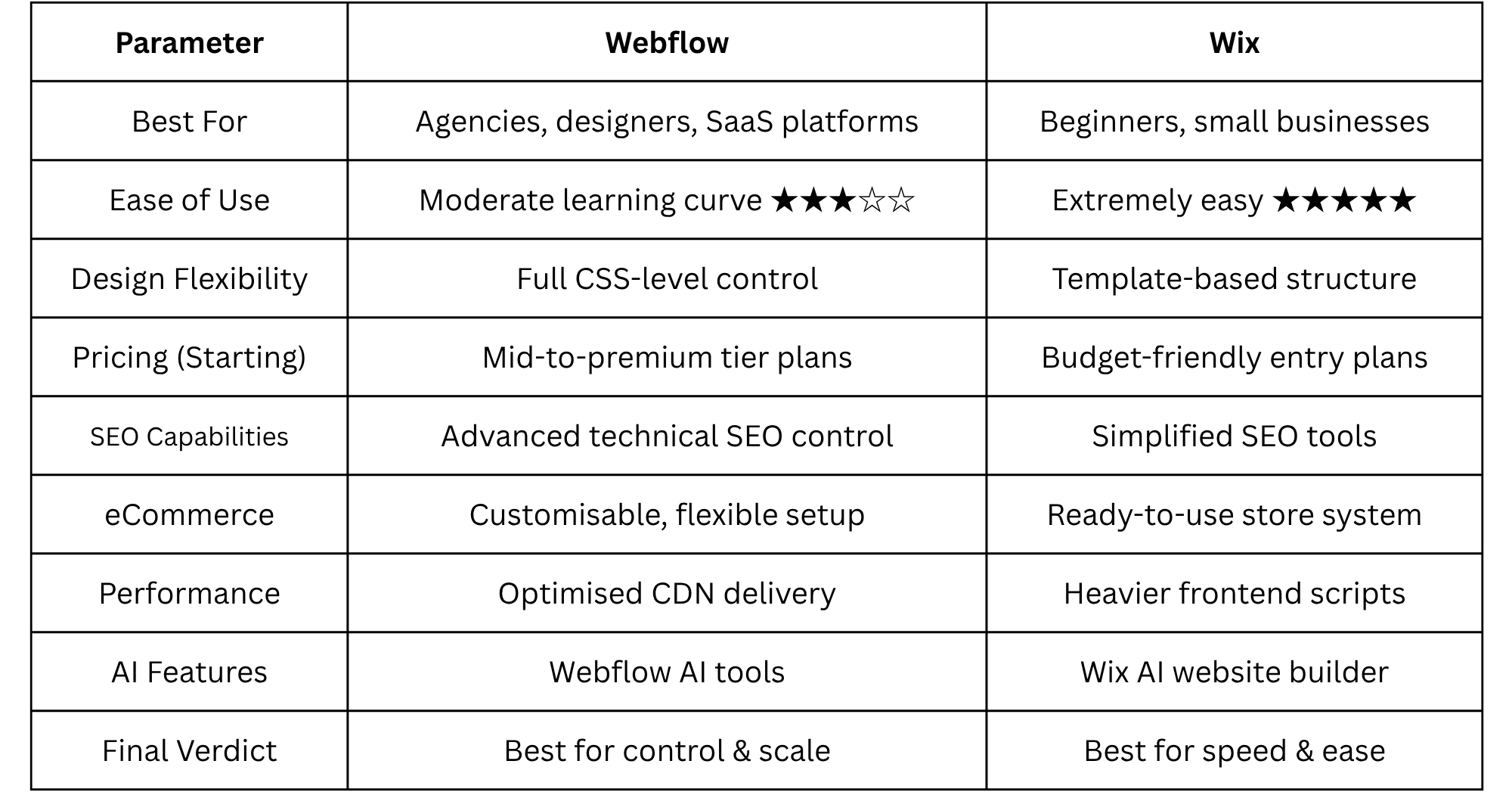
Comparison Table: Webflow vs Wix at a Glance
Here is a quick table that compares Webflow and Wix
Why the Webflow vs Wix Debate Matters in 2026
With all the updates introduced since 2026, the Webflow vs Wix topic is more relevant than ever as the two platforms grow closer together in terms of user segments yet maintain totally distinct frameworks. Wix now runs over 200 million websites across the globe and can rightfully be considered one of the most popular website builders on Earth. Webflow, on the other hand, while having fewer users in terms of overall adoption rate, boasts a wide variety of design-oriented companies, agencies, and startups among its users.
The main difference between the two platforms is not so much in which one performs better than the other; the difference is mainly philosophical. Wix allows the users to abstract themselves from the underlying website structure through drag-and-drop and publish functionality, while Webflow provides an almost real-world website building experience that involves actual website structure yet remains mostly visual at the same time.
As for 2026, both of these platforms have their own sets of AI tools, powerful hosting solutions, and improved responsive design systems. The Wix Studio tries to introduce professional capabilities into the world of Wix, while Webflow is continuously improving its content management solution and hosting performance.
At the same time, new SEO standards such as Core Web Vitals have made performance and clean code more important than ever when choosing a platform.
Here, in this blog, we will break down Webflow vs. Wix across nine practical dimensions to help find out which platform is more suitable for different website needs. Let’s begin.
1. Design Flexibility & Customization
Design flexibility is how much the user can dictate layout structure, responsiveness, and visual hierarchy of the website builder when building their website.
Webflow: 5 out of 5 stars
Webflow gives users a virtual interface that is almost identical to CSS and other logical principles used in front-end web development, which gives users the ability to create grids and flexboxes and have custom breakpoints. Webflow also allows users to manage advanced interactions, which will help create precise, visually appealing, and scalable designs. This makes Webflow a great choice for building a complex website that will need to have a consistent design throughout its pages and components.
Wix: 4 out of 5 stars.
Wix gives users a much easier way to build a website using drag-and-drop elements that can be placed anywhere within the template design. Although Wix Studio introduced new controls for responsive designs and a new grid system, it is still limited by the number of elements placed on any particular page compared to Webflow, resulting in prioritizing the speed of design over building a solid foundation.
Winner: Overall winner is Webflow, for its superior structural and visual control over design.
2. Ease of Use & Learning Curve
Ease of user of a platform defines how relevantly users become familiar with the platform and quickly publish an active website.
Webflow: 4 out of 5 stars.
In order to effectively publish a fully functioning website using the Webflow platform, a user is required to first understand fundamental front-end development concepts related to understanding the layout hierarchy, spacing system, and visual structure. Although Webflow offers a steeper but gradual learning curve than that of a traditional website publishing program, it does have educational resources available from Webflow University, which aids users in building their knowledge.
Wix: 5 out of 5 stars.
A key design consideration of every aspect of the Wix user interface is to allow users to be productive quickly. After selecting a free template the user can visually modify the template with structural and content changes in a very short period of time. The user experience within the Wix platform is simple to intuitively navigate, while the use of Wix ADI allows the platform to create a completely functional website using only the user's responses to questions presented by the Wix platform.
Winner: Wix - faster onboarding process and greater accessibility to new users/more user-friendly.
3. Templates & Pre-built Designs
Making use of pre-built design and templates when designing helps users to deploy their website faster and more efficiently.
Webflow: 4 out of 5 stars.
Webflow has a curated set of beautiful templates created by professional designers, which have a focus on providing solid structure, quality typography, and modern design principles. While Webflow's template library is smaller than Wix's, the templates themselves are considerably more extensive and provide a higher level of ability to customize than those on the Wix platform.
Wix: 5 out of 5 stars.
Wix offers the largest library of templates available. With hundreds of industry-specific templates available for users to deploy quickly, the only drawback here is once a template has been chosen, switching to another one later will be difficult due to the structural constraints imposed by each of the original templates chosen.
Winner: Wix, based on the large number of templates available for immediate use.
4. Pricing & Plans (2026)
Pricing plans play an important role in selection of platforms, especially for small businesses.
Webflow: 4 out of 5 stars.
Webflow's pricing will depend on their site plan, whether or not you need CMS-based sites and/or e-commerce; however, while Webflow appears to be more expensive on a monthly basis for the entry level site, there will be less need for third-party plugins and tools; so, over time, both the entry level and overall cost could compare for both.
Wix: 5 out of 5 stars.
Wix has a bundle price in that it includes web hosting, web templates, and tools; and so, WIX will be more cost-effective to set up for an Example of a User looking for all-inclusive at the beginning with no other setup.
Wix is the winner because of a lower upfront investment, and they provide a bundle of services.
5. SEO Capabilities
The capability of a website for SEO determines the effectiveness with which the website can rank in search engine results as well as how effectively those same search engines can crawl and interpret the website’s content.
Webflow - 5 Stars
Webflow has excellent technical SEO controls including an HTML structure that is clean to implement (thus better for the search engines) and allows the user to edit meta data; supports schema, as well as allows the user to redirect in a manner many other systems do not, and sits on a fast server. These features help to strengthen a website’s Core Web Vitals and create a better long-term SEO result.
Wix - 4 Stars
Wix improved their SEO tools significantly recently, providing structured settings, automated suggestions, and greater indexing capabilities. While Wix does generate a lot of backend scripts, it does not generate as many as Webflow; compared to Webflow, it does not produce output as clean in comparison to Webflow.
The result: Webflow is the winner because it produces the cleanest output and has the best technical foundation for an SEO system.
6. e-Commerce Features
Webflow: 4 out of 5 stars.
Webflow e-commerce is best suited for design-focused brands, as they offer full design control over product pages and checkouts. But they may require additional configuration for meeting the needs of large businesses.
Wix: 5 out of 5 stars.
When it comes to e-commerce, Wix is much easier to set up and help manage without technical involvement. The fully integrated e-commerce system of Wix has everything, including shipping tools, built-in marketing features, payment processing, inventory management, and more.
Winner: Wix is the winner here.
7. Integrations & Apps
Webflow: 4 out of 5 stars.
Webflow supports integrations through APIs, automation tools like Zapier, and custom code solutions. It is flexible but requires more technical setup.
Wix: 5 out of 5 stars.
Wix has an extensive app market with hundreds of pre-built applications for integrating bookings, marketing, analytics, and automation with an e-commerce store. Integration of Wix with these different applications from their app market can be done with minimal user effort.
Winner: Wix, due to a broader and more accessible ecosystem.
8. Performance, Speed & Scalability
Webflow: 5 out of 5 stars.
Webflow utilizes global CDN hosting, which produces optimized code supporting fast load times and strong performance for Core Web Vitals. The usage of CDN also gives Webflow the capability to handle content-heavy or high-traffic sites efficiently.
Wix: 4 out of 5 stars.
Wix's performance has improved, but there are still a number of heavier scripts in their frontend structure that can negatively impact page loading time for larger and/or more complex sites.
Winner: Webflow is the winner in this category based on the fact they have a cleaner architecture and scalability.
9. Customer Support, Community & Learning
Webflow: 4 out of 5 stars.
Webflow has extensive documentation, has a large design community, and offers structured learning through Webflow University. Their support is solid but primarily community-driven.
Wix: 5 out of 5 stars.
Wix offers 24/7 customer support along with assisted onboarding, extensive help content, and general user experience. Their ability to offer so much assistance makes them much easier to utilize for a user who is not tech-savvy.
Winner - Wix wins this component due to their direct and accessible support channels.
Key Factors to Consider When Choosing Between Webflow and Wix
There are several factors that need to be considered while choosing between Webflow and Wix. A few of these factors are:
1. Design goals: Structured, scalable design systems. Simple and fast design solution.
2. Technical level: Beginner tools. Designer or professional tools.
3. Growth: Scalable for complex builds.
4. SEO: Technical SEO strong control.
5. Budget: Less cost initially, better cost per hour in the long run.
6. Migration: More control on how to scale and re-structure.
Webflow vs Wix Studio: Does Wix Studio Change the Verdict?
Wix Studio brings together the ease of use of creating a website using the best of the best website design workflows available for designers today. The platform has made improvements to its responsive grids, and also has added many additional layout controls and made styling much more flexible versus what existed in the original Wix product.
While Wix has made improvements to these types of items, Webflow still has an advantage when it comes to CMS flexibility, control structurally and output quality of code. Wix Studio is a nice upgrade to current users, but doesn't match Webflow in scalable design systems and performance optimization.
So we can say that the overall winner is still as it has always been. Wix Studio has greatly improved Wix, but Webflow is still the better long-term solution for professional use cases.
How We Evaluated Webflow vs Wix
We evaluated both these platforms after trying to create real websites, conducting performance tests and using each for various practical tasks. We did not rely on theoretical features to assess either platform, but instead, conducted a hands-on evaluation under real-world conditions where usability, flexibility, SEO performance, scalability and ecosystem strength directly impact final website results.
The purpose of this evaluation is to understand how well each platform performs in actual use on real-life projects (e.g., business websites, content driven sites, small e-commerce sites). By evaluating both platforms in real-world conditions, we were able to do a true comparison of both platforms outside of marketing claims.
In our evaluation of both platforms, it quickly became apparent that the ultimate Webflow vs Wix decision will be based on which platform you value more- speed or control. Overall, Webflow offers greater performance, more options for design flexibility, and more scalable growth than Wix.
While Wix excels in terms of ease of use, cost effectiveness, and speed, Webflow still remains the best choice for long term performance, scalability, and effectiveness.
If you are still curious about how to choose the right platform for your business or would like to get help with streamlining your website strategy and performance, do not hesitate to contact us.


